
Build apps and fix code with ad-funded coding access; check current model and session limits.
Provider-checked pricing
AI TOOL DETAILS
CoWork OS organizes agent tasks in a desktop workspace for users who want to work with local project files. Its README describes local Ollama and LM Studio connections, allowing a no-API path; paid cloud models and local compute are separate.

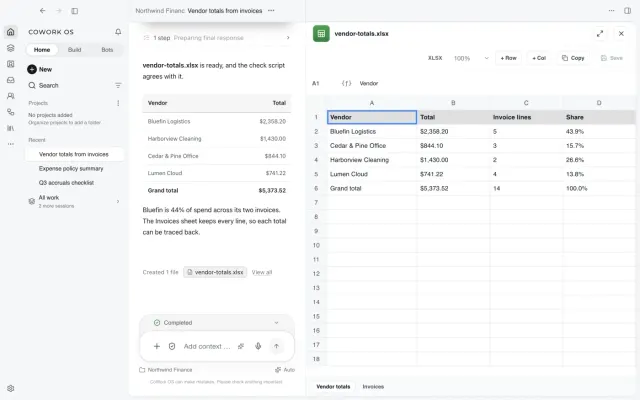
The listed option is free to use. Hosting or model usage may still cost money.
The MIT app is free to install. Ollama or LM Studio can provide local inference without a paid API; models and their licenses are separate downloads and local hardware is required. Hosted provider calls can incur the provider’s own charges. Application license: MIT. This does not grant the license for separately downloaded model weights; check a model's license and compatibility independently.
Provider pricing checked 3 Nov 2026.
Local inference can avoid a paid model API when this app is connected to a compatible local model. The app license does not license model weights. One example is Qwen2.5-Coder-7B-Instruct-GGUF, whose separate weight license is Apache-2.0; compatibility and download requirements depend on the app’s supported runtime. Other models may have different terms. Model downloads, storage and local hardware are separate costs.
Model license checked 3 Nov 2026. Read this example model license
Follow the publisher’s current installation or quickstart guide for the edition and device you want to use. Tool-specific installation steps have not yet been checked by AltStack.
No one-line command has been verified for CoWork OS; follow its official installation instructions instead of guessing a Docker image or installer.
CoWork OS provider setup documentationRead the repository for the license, installation steps, and operating costs.
Source repositoryView the full software profileRead a practical guide before choosing a plan or setting up a workflow.
How to use an AI coding tool and check its workThis preference stays on your device. It does not change public rankings.
Build apps and fix code with ad-funded coding access; check current model and session limits.
Provider-checked pricing

Build AI chatbots and automated workflows.
Provider-checked pricing
Build and test software that uses AI.
Provider-checked pricing
Allow Google Analytics to measure page visits and basic device information using cookies? Your searches and form entries are excluded. You can change this choice at any time. Privacy details.