Platform information checked 2026-10-28. Official README specifies Linux, Python 3.8+, GTK4, libadwaita and its Python dependencies for a source build. The provider links Flathub and GNOME Builder instructions.
Draw diagrams, tables and tree structures with plain characters in a local Linux app.
Free local ASCII diagram editor
The GPL-3.0-or-later app has no required software subscription. You supply a Linux computer and any build tools if compiling it. Its character-canvas workflow is a task alternative for simple diagrams; Visio file compatibility, cloud collaboration and commercial stencil libraries are not established by this review.
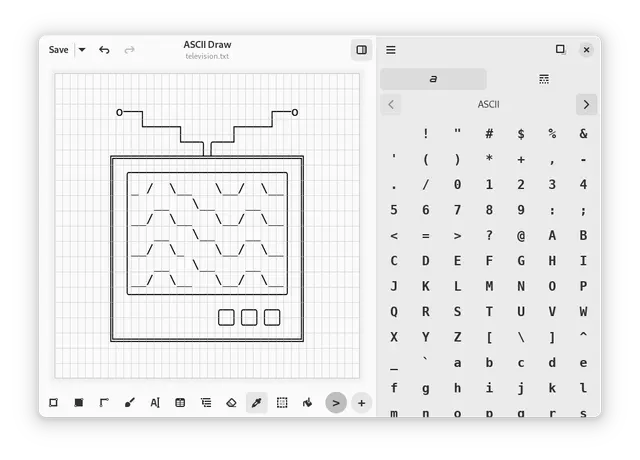
ASCII Draw · Provider product screenshot from project documentation; the interface may show an earlier release. Not an AltStack execution.Product image: Nokse and ASCII Draw contributors · GPL-3.0-or-later · Original image; layout scaled to fit. Provider product screenshot from project documentation; the interface may show an earlier release. Not an AltStack execution. Full notice.Logo: Nokse and ASCII Draw contributors · GPL-3.0-or-later · Original image; layout scaled to fit. Official project logo; no endorsement implied. Full notice.
About ASCII Draw
Draw diagrams, tables and tree structures with plain characters in a local Linux app. Visit the project website to check the currently available deployment options.
Release status
Provider downloads or installation route reviewed; AltStack did not install or execute the application.
Install on your computer · Instructions checked 2026-10-28
Use the Flathub page linked from the official README for a Linux installation, or follow its GNOME Builder instructions if building from source.
For a source build, check the documented Python 3.8+, GTK4, libadwaita and Python dependency requirements before proceeding.
Start a small plain-character diagram using the app’s character palette and drawing tools; this is a text canvas rather than a Visio document.
Save a disposable example and reopen it before using important documentation. Confirm that its plain-text layout works in the destination editor and font.
Plain-character diagrams require a different workflow from Visio or Lucidchart shapes and collaborative files; no format migration or full feature parity was tested. These are provider-documented starting steps; AltStack did not install or execute the application.
Self-hosting & quickstart specs
License
GPL-3.0
Deployment
Local desktop application
Free edition / costs
Free local ASCII diagram editor. The GPL-3.0-or-later app has no required software subscription. You supply a Linux computer and any build tools if compiling it. Its character-canvas workflow is a task alternative for simple diagrams; Visio file compatibility, cloud collaboration and commercial stencil libraries are not established by this review. Pricing evidence.
Devices / hardware
Official README specifies Linux, Python 3.8+, GTK4, libadwaita and its Python dependencies for a source build. The provider links Flathub and GNOME Builder instructions. Hardware, storage and backups are supplied by you; no universal RAM minimum was verified.
No one-line command has been verified for ASCII Draw; follow its official installation instructions instead of guessing a Docker image or installer.
The basic Excalidraw browser whiteboard is free. Excalidraw Plus is a separate paid workspace with additional organization and collaboration features. Check its current billing selection and trial conditions before upgrading.
Docs, whiteboards, and databases in one privacy-first workspace.
AFFiNE lists a free local editor and Cloud Basic with unlimited local workspaces, 10 GB cloud storage, a 10 MB file limit and up to three members per workspace. Paid Pro, Team, AI and commercial licensing are separate. Self-hosted licensing depends on release and components; backend/common-native code are exceptions to the root MIT grant. Confirm the paid-plan billing toggle before comparing amounts.
Procedural vector editor that runs in your browser, no signup needed.
Provider explicitly describes Graphite as free forever and open source, currently alpha. README identifies MIT/Apache-2.0 dual licensing, although default license paths were unavailable. You supply device resources; no paid hosted service allowance is claimed.
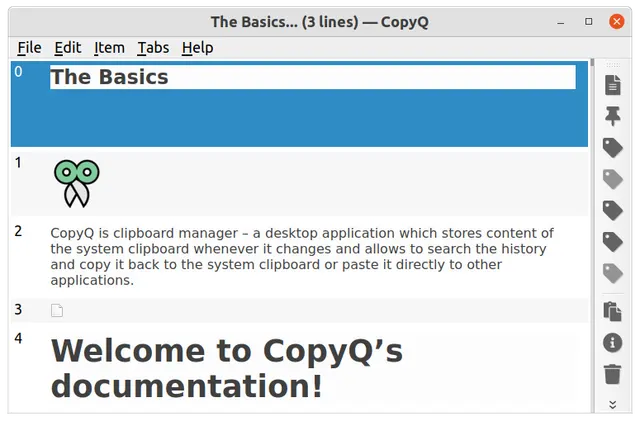
Search, edit and reuse a local clipboard history with optional tabs and automation.
The GPL-3.0 source and documented desktop packages have no required application subscription. Your computer, storage and backups are separate costs; no managed synchronization service or cloud quota is included.
Allow Google Analytics to measure page visits and basic device information using cookies? Your searches and form entries are excluded. You can change this choice at any time. Privacy details.