
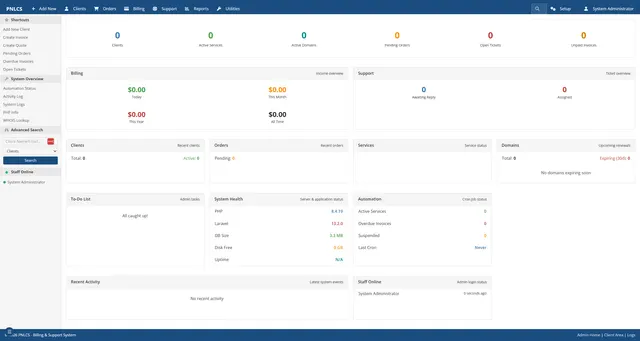

PNLCS is an MIT-licensed, self-hosted billing and customer portal project aimed at hosting providers. It can be evaluated as a WHMCS alternative when you can operate a PHP and database stack yourself. The source code has no license subscription; a production service still needs infrastructure, secure operations, email, domains, payment accounts and backups. This guide follows the project's current README and WHMCS's published plan page. AltStack reviewed those sources and did not install or execute PNLCS.
Check that PNLCS fits the kind of billing you run
PNLCS is built for hosting businesses: the repository describes invoices, domains, tickets, reseller workflows and server modules inside a client portal. It is not a general-purpose subscription-billing package for every SaaS business. List the products you sell, payment methods, tax and invoice rules, domain registrar workflows, service provisioning and support paths you rely on in WHMCS. Compare each need with the current PNLCS documentation and run a staging migration with disposable records before planning a switch. The projects have different feature histories and integrations, so a similar category name does not prove feature parity.
Compare the software license with the operating cost
The PNLCS repository is MIT-licensed, so using the source does not require a PNLCS license subscription. It does not provide a hosted service. A real installation uses a server, PHP runtime, database, domain, TLS certificate, mail delivery and backups; payment processors and registrars can also charge fees. Those providers are separate from the MIT source and their current terms determine your actual operating cost. The optional official Docker image is a deployment route, not a claim that hosting or payment processing is free.
Compare with WHMCS's current published plans
WHMCS lists self-hosted Plus at $34.95 per month for up to 250 active clients, Professional at $54.95 for up to 500 and Business at $84.95 for up to 1,000; prices exclude tax. Its fully managed plans list Starter at $9.99 for up to 25 active clients, Growth at $25 for up to 100 and Expansion at $75 for up to 300, also excluding tax and with published overage terms. Check the live pricing page for current terms and eligible add-ons before making a financial decision. This is a plan-price comparison, not a promise that PNLCS replaces every WHMCS module or support service.
Install PNLCS in a private Docker trial
Install Docker on a machine you control and follow the three-command sequence above: create a private Docker network, start MariaDB with a persistent data volume, then start the PNLCS runtime with its own persistent application volume. The example maps port 8090 only to the local loopback address and sets the local application URL. The first start installs the current stable package inside the runtime; the provider says to open `http://localhost:8090/install` and finish the setup wizard. The upstream example binds the port to all interfaces, so this guide narrows it to `127.0.0.1` for a local trial. Use separate secrets for the database root and application user. Do not treat this minimal trial as a hardened production recipe.
Prepare a production host before entering customer data
The README currently specifies PHP 8.4, MySQL 8.0 or MariaDB 10.6+, Composer 2, Nginx or Apache with PHP-FPM, and Node.js 18 or newer only when building frontend assets. It lists required PHP extensions and says roughly 1 GB RAM can work for a small install, with 2 GB more comfortable when the database shares the server; it recommends allowing at least 2 GB disk for data, uploads, backups and logs as they grow. The documented Docker image bundles PHP-FPM 8.4 and Nginx. For native hosting, set the document root to the app's `public/` directory, keep `.env` outside web access, use least-privilege file ownership, enable HTTPS, and configure SMTP and the scheduled tasks. Confirm the full current installation guide because package and operating-system requirements change.
Secure payment, mail and provisioning integrations
The application can connect to payment gateways and server or registrar modules, but the source repository does not grant accounts with those providers. Use each integration's official configuration steps, test mode and webhook verification. Store credentials in the application's protected configuration, restrict administrator access and never include live keys in a screenshot or backup shared for support. Configure HTTPS before checkout or admin sign-in. Verify invoice numbering, taxes, refunds, failed-payment behavior, recurring billing and provisioning suspension in staging. A payment processor may charge its own fees even when the billing application is free.
Make backups and test an update before using a live portal
Keep separate, restorable copies of the database, uploaded files and configuration secrets. Test a restore on a private staging host before taking customer payments. The official Docker instructions describe persistent volumes and an update command; the native install instructions describe putting the application into maintenance mode, taking a database backup, updating dependencies, applying migrations, rebuilding frontend assets and refreshing the application cache. Review the release notes and update guide for the exact version you operate. Never assume a container volume alone is a backup: deletion, disk loss or ransomware can affect it too.
Understand the data and service boundaries
Self-hosting gives the operator control over the application host and database, but the operator also becomes responsible for account data, access control, retention, encryption, backups, breach response and applicable privacy obligations. Email, payment gateways, registrar APIs, remote backups and optional AI or OCR integrations may send data to other services under their terms. Map those data flows and disclose them to customers before enabling integrations. Do not store card details unless the payment provider's documented architecture and applicable requirements support the design; prefer provider-hosted payment components where available.
Troubleshoot the common first-install failures
If the app returns HTTP 500 before the Laravel log appears, confirm the web server's PHP-FPM is actually running PHP 8.4; the upstream README says PHP 8.3 can install dependencies but then fail at runtime. For a database connection or missing-table error, check the `DB_*` settings, database service and completed migrations. If the installer cannot write `.env`, correct ownership so the application runs as the web-server user. If `.env` can be opened in a browser, the document root points too high; point it to `public/`. If queued mail is not sent, check SMTP configuration and the documented scheduler/worker. The upstream troubleshooting section lists these as frequent causes.
Decide with a staged migration, not a feature-count claim
PNLCS is worth a pilot if you operate a hosting-provider workflow, want to inspect the source, and can maintain PHP, database, mail, backups and payment integrations. WHMCS may remain the practical choice if a required module, managed service or established workflow is not yet available in PNLCS. Import a small test dataset, run billing and service-lifecycle cases, compare exports, measure operational effort and check current support channels. AltStack has not run this migration or the installer; follow the linked provider instructions and keep the current billing system available until your own acceptance checks pass.
Official instructions and sources
PNLCS official README: license, requirements, Docker, installation and troubleshootingPNLCS official installation documentationPNLCS MIT licenseOfficial PNLCS runtime image documentationWHMCS official self-hosted and managed pricingOriginal AltStack guide by Sushil Kumar Sah. Installation steps follow provider documentation; they do not imply testing on every supported device.