

Search Console's Queries table can reveal searches phrased as questions, and the page dimension can show which existing URL appeared for each one. The expression below is a practical English-language starter for question-like queries. It is a research filter, not an exhaustive question detector or a ranking technique. In the completed October 1–28, 2026 report, Search Console returned 914 query rows; applying the same pattern locally selected 12 rows with 25 impressions and no clicks. That is a bounded sample of returned rows, not every query searched.
What does this Search Console regex match?
The pattern matches a query when it starts with one of the listed English words and that word ends at a word boundary. The ^ anchor means the word must appear at the beginning; the \b after is prevents it from matching the start of island. The grouped words are alternatives, so any one of them can begin the query. There is no final full stop in the expression.
Search Console uses RE2 syntax, performs case-insensitive regex matches by default, and otherwise looks for partial matches unless you anchor the expression. This expression only anchors the start. It therefore accepts the rest of the query after a matching first word. Google's advanced filtering guide documents the matching behavior and the Custom (regex) control.
How do I apply the filter in Search Console?
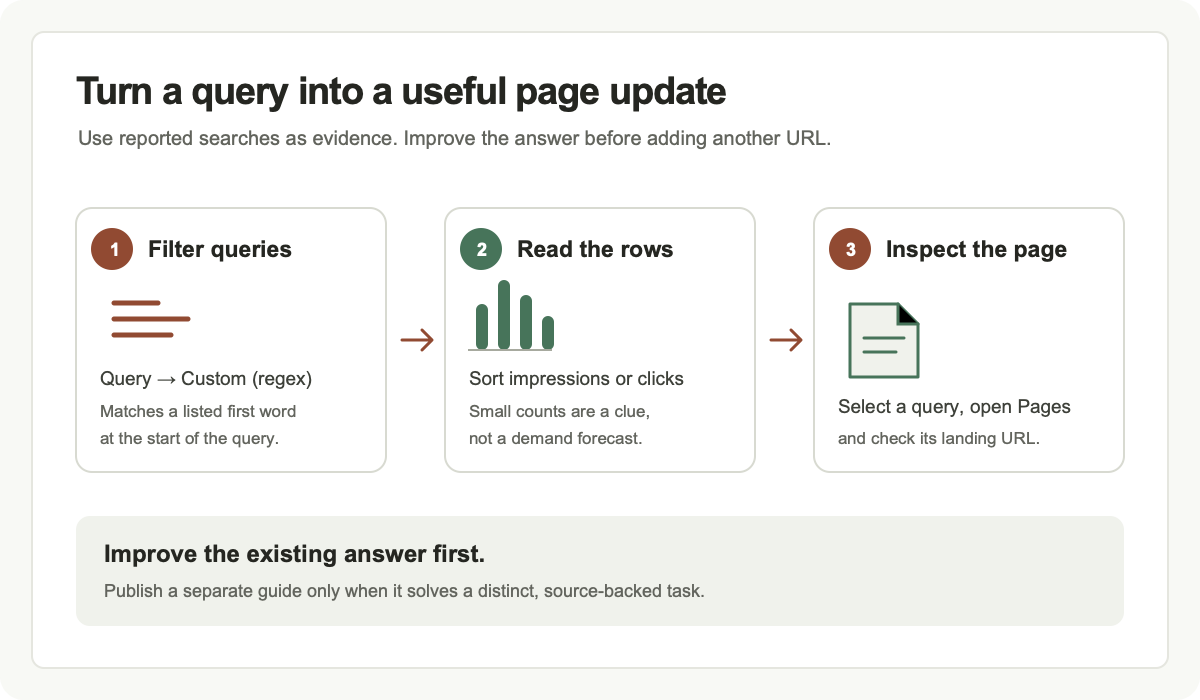
Open your property's Performance report and choose Search results. Select a date range and search type, then use the table's Queries dimension. In the filter bar, choose + Add filter → Query → Custom (regex). Leave Matches regex selected, paste the expression shown above, and choose Apply. The exact report layout may change, but the provider's current instructions use this path.
The filter changes which query rows are shown; it does not save a permanent site setting, create content, request indexing, or change rankings. The regex can also be applied to Pages, but this example is for Queries. Avoid adding unrelated country, device, or page filters until you have recorded the unfiltered question sample you want to inspect.
How should I read the matching query rows?
Keep the Queries tab open and compare impressions, clicks, click-through rate and average position for each returned row. Sort by impressions to find questions Google has shown repeatedly in the selected report, or sort by clicks to find questions already sending visitors. A high impression count with few clicks may be worth inspecting, but it does not prove that a new article is the right response.
Select an individual query row to filter the report to that query, then open the Pages dimension. This reveals the landing page associated with the selected query in that report. Read that URL as a visitor would: does its title describe the task, does its first answer address the question, and can someone reach the next useful step without searching the site again? If the query belongs to a different canonical URL, investigate that page rather than assuming the displayed URL is a separate index entry.
What did AltStack's October 29 question sample show?
A local analysis applied this expression to the 914 query rows returned in AltStack's completed October 1–28, 2026 Search Console report. Twelve rows matched, totaling 25 impressions and zero clicks in that returned sample. The connector exposed equals and contains filters rather than a server-side regex operator, so the expression was applied locally; no saved Search Console filter was changed. These figures describe the returned rows for this interval, not every Google search or every anonymized query.
One returned question about a first UI draft from a written brief had three impressions at an average position of eight and was associated with a general AI-writing page. AltStack already has a more specific written-brief-to-UI guide, so a contextual link and a direct answer on the existing page are more defensible next steps than another near-duplicate article. Another question about a form builder led to a broad category page; the correct next step is to verify that category's actual contents, not to invent a product identity from the wording of a query.
How do I decide between updating a page and writing a guide?
Start with the task behind the query and the page that already appears. If the answer exists but is hard to find, move a concise factual answer nearer the heading, clarify the page title, add a useful internal link, or correct outdated pricing and setup details. Keep the existing URL when it already serves the same intent; avoid publishing a second page that repeats it with only a changed tool name.
Write a separate guide only when it answers a distinct task in enough detail to help someone finish it. Check the official product documentation, license or pricing page for facts that may change. Explain free-plan limits separately from open-source licensing, local hardware, hosting and optional API charges. If you cannot identify the product or substantiate its claims from a primary source, record the query as unresolved rather than filling the gap with assumptions.
How can I turn a question into a useful answer?
Write the direct answer first. For a pricing question, identify the product and edition and state what the free option includes. For an open-source question, verify the actual repository license and identify which edition it covers. For a setup question, list the prerequisites, the supported steps, the expected result and the most likely recovery path. Link to the current provider documentation beside any version-sensitive instruction.
Use one concrete example that matches the query, then separate what you verified from what remains uncertain. A local AI application does not automatically provide free cloud inference; a self-hosted service still needs a machine, storage, backups and maintenance. Avoid claims about a universal best choice when the result depends on hardware, privacy requirements or a particular workflow.
How do I measure an editorial update fairly?
Keep a dated note of the changed URL, the query or page cohort, the reason for the change and the before-and-after reporting periods. Compare the same Search Console property, search type, country, device and query filter when those dimensions matter. Review the question row and its landing page together. A sitewide change cannot establish that one paragraph or title caused a later movement.
Use periods long enough to reduce noise, and distinguish preliminary recent data from completed dates. Do not call a temporary absence of rows proof that traffic is zero. A single extra click can create a large percentage swing on a small cohort. Search Console is evidence about the site's recorded results; it does not guarantee impressions, a position, clicks or inclusion in a particular answer engine.
Why might the regex return no rows or miss a question?
Check that the filter is set to Query, Custom (regex) and Matches regex, and that the pattern begins with ^ and ends with the two-character word-boundary expression \b. A pattern pasted with surrounding quotation marks, smart punctuation, or an added full stop may not behave as intended. Search Console's default is case-insensitive, so a capitalized first word should still match.
The expression misses questions that begin with other words, contain no listed starter, use another language, or start with a product name followed by a question. It can also return a query whose meaning is not actually a question. Search Console omits anonymized queries and limits which rows appear in its table, so the filtered table is not a complete census. If you need a different language or intent, design and validate a separate pattern against representative examples before using it for editorial decisions.
Official instructions and sources
Google: Search results advanced filters and regex behaviorGoogle: Performance report overview and metricsGoogle: query rows, anonymization and data limitsGoogle Search Console API: Search Analytics query limitsGoogle Search: creating helpful, people-first contentOriginal AltStack guide by Sushil Kumar Sah. Installation steps follow provider documentation; they do not imply testing on every supported device.