Allow Google Analytics to measure page visits and basic device information using cookies? Your searches and form entries are excluded. You can change this choice at any time. Privacy details.
Loading this page…
Photo Editing Software
LazPaint
WindowsmacOSLinux
Platform information checked 2026-10-17. LazPaint is free GPL-3.0-or-later desktop software, with optional donations and no required hosted account. It can replace basic Photoshop drawing, layered composition and image-adjustment tasks; full Photoshop feature or PSD compatibility is not promised. Your hardware and storage are separate costs. Scripts can need separately installed Python.
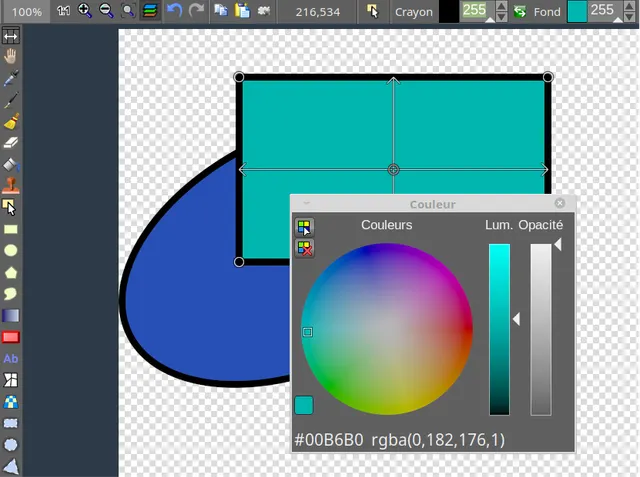
Edit images with raster and vector layers, drawing tools, color adjustments and filters.
Free desktop image editor
LazPaint is free GPL-3.0-or-later desktop software, with optional donations and no required hosted account. It can replace basic Photoshop drawing, layered composition and image-adjustment tasks; full Photoshop feature or PSD compatibility is not promised. Your hardware and storage are separate costs. Scripts can need separately installed Python.
Edit images with raster and vector layers, drawing tools, color adjustments and filters. Visit the project website to check the currently available deployment options.
Release status
Official public installation packages and provider setup documentation are available. Availability was source-checked; the application was not installed or executed by AltStack.
Install on your computer · Instructions checked 2026-10-17
Open the official LazPaint download page. Choose the Windows setup or portable archive, the matching Linux package or AppImage, or the macOS 64-bit DMG. Check the CPU and toolkit variant before downloading.
Install or extract the selected build and launch LazPaint. Open a copy of a small image, or start a new canvas. Keep the source image separate from your output.
Use the Layers panel to add a layer, then try a shape or text object. Choose a color and use the drawing, selection or color-adjustment tools on that layer.
Save work in the native LZP format to preserve layers. Export a separate PNG or JPEG for sharing and reopen it to check the result; flattening discards layer structure.
LazPaint is free GPL-3.0-or-later desktop software, with optional donations and no required hosted account. It can replace basic Photoshop drawing, layered composition and image-adjustment tasks; full Photoshop feature or PSD compatibility is not promised. Your hardware and storage are separate costs. Scripts can need separately installed Python.
Create and edit AI images, video and 3D scenes. Free editor; AI generation may cost extra.
The editor source is available under MIT or Apache-2.0 and has a free option. Hosted AI generation may require credits or a subscription; connected providers and your own compute can charge separately. The public pricing page did not expose reliable current plan amounts during this check, so no dollar price is asserted.
The official Krita desktop download is free. Microsoft Store and Steam editions charge to support development; their store prices vary. The software is GPL-3.0 and artwork you create remains yours.
Edit photos and create images without a software subscription.
Official GIMP downloads are free, with no subscription. It can be used for commercial work under GPL-3.0-or-later. Third-party bundles or training may charge separately.