A local workspace for supported coding-agent CLI sessions.
Free MIT source build · CLI costs separate
The official repository describes Cogpit as free and MIT-licensed, and a source build contains the local desktop/web app. Official binaries may include a separate proprietary Cogpit Team UI that is not covered by the repository license; its current price and terms are not inferred here. Supported CLI subscriptions, model usage and API charges remain separate.
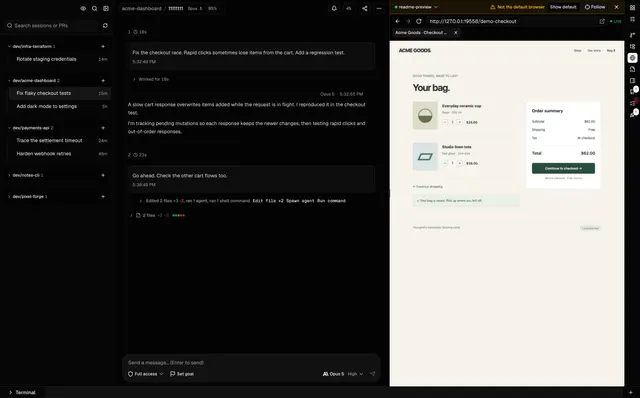
Cogpit · Official product screenshot with sample coding sessions and Acme checkout demo data; no AltStack or customer activity is shown.Product image: Gentrit Biba and Cogpit contributors · MIT · Original image; layout scaled to fit. Official product screenshot with sample coding sessions and Acme checkout demo data; no AltStack or customer activity is shown. Full notice.Logo: Gentrit Biba and Cogpit contributors · MIT · Original image; layout scaled to fit. Official product logo reproduced unchanged to identify and link to this project; no endorsement implied. Full notice.
About Cogpit
View supported Claude Code, Codex and Copilot CLI sessions, file changes and browser activity in one local desktop or web workspace. Provider usage and the binary-only proprietary Team UI have separate terms. A self-hosting option is recorded for this project. Review the official deployment instructions and maintenance requirements before running it yourself.
Release status
Official README, license and source-listed installation options reviewed on 2026-10-31; AltStack did not execute candidate code or installers.
Install on your computer · Instructions checked 2026-10-31
Install and sign in to one supported agent CLI using its own official provider instructions before connecting it to Cogpit.
For the local browser interface, install Node.js 20.11 or newer and run the official launcher command: npx cogpit@latest. Keep the terminal open while using the local interface; press Ctrl+C to stop it.
For one session, use the documented command npx cogpit@latest preview <session-id> with an identifier from your own supported CLI.
For a headless source setup, use the official repository instructions: install Bun, then run bun install, bun run build, and bun server/standalone.ts. The documented default bind is 127.0.0.1:19384.
Keep a headless service on loopback unless remote access is necessary. For intentional remote access, set the documented network password (minimum 16 characters), serve it over HTTPS, and follow the upstream reverse-proxy guidance.
Documented source-build commands only; AltStack did not execute the repository, launcher or installer. Cogpit is the local workspace; supported agent CLI model access remains subject to the respective providers and account costs.
Self-hosting & quickstart specs
License
MIT
Deployment
Local browser interface, desktop application, or optional headless local server.
Free edition / costs
Free MIT source build · CLI costs separate. The official repository describes Cogpit as free and MIT-licensed, and a source build contains the local desktop/web app. Official binaries may include a separate proprietary Cogpit Team UI that is not covered by the repository license; its current price and terms are not inferred here. Supported CLI subscriptions, model usage and API charges remain separate. Pricing evidence.
Devices / hardware
Node.js 20.11 or newer for the documented npx launcher. Install and authenticate at least one supported agent CLI separately. Remote headless access requires the project’s network password and HTTPS guidance.
npx cogpit@latest
The official README documents this local launcher and says it opens the browser interface on an available local port. Keep the terminal open while using it and press Ctrl+C to stop it. This command was not executed by AltStack; it does not install a coding-agent CLI or provide model access.
Documentation checked 2026-10-31; command not executed by AltStack.
Coordinate AI agent teams through shared goals, task ownership, and cost visibility.
The MIT-licensed local/self-hosted app has no Paperclip account requirement or software license fee. You supply model/provider access and any server or database resources, which can cost extra. Hosted offerings are separate from this local edition.
Run coding agents side by side in a development environment organized around parallel work.
The provider describes Orca for macOS, Windows and Linux as free and open source. Connected coding agents, API providers, subscriptions and remote machines have their own costs. No included paid-agent allowance is assumed.
AI pair programmer that works inside your terminal.
Aider itself is free software. Paid model providers charge for tokens and usage; compatible local models use your own hardware. Your selected provider determines model cost, context limits and any required API credit.
Host local code completion and coding chat for yourself or a small team.
The provider lists free locally deployed Community for up to five users. You provide compatible compute/GPU, storage and separately licensed models. Team and Enterprise add paid features; their full current terms and all source-component licenses are outside this plan check.
Official site explicitly calls T3 Code free/open source and tells users to plug in the harness they already pay for. MIT local code does not include Claude/Codex subscriptions or external provider usage.
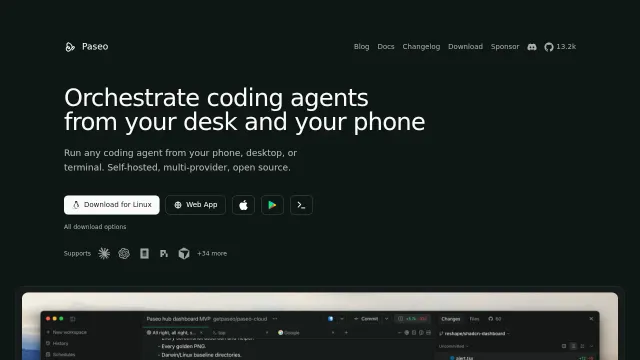
Run coding agents from your phone, desktop, or terminal.
The Paseo repository edition is available under Apache-2.0 with documented installation or build instructions and no required source-license subscription. Your server, storage, backups and administration remain your costs. External model/API usage is billed by its provider; no model allowance is included. This check covers that source edition; managed services, premium extensions and commercial relicensing, if offered, are not included or price-verified.
Allow Google Analytics to measure page visits and basic device information using cookies? Your searches and form entries are excluded. You can change this choice at any time. Privacy details.