
Build apps and fix code with ad-funded coding access; check current model and session limits.
Provider-checked pricing
AI TOOL DETAILS
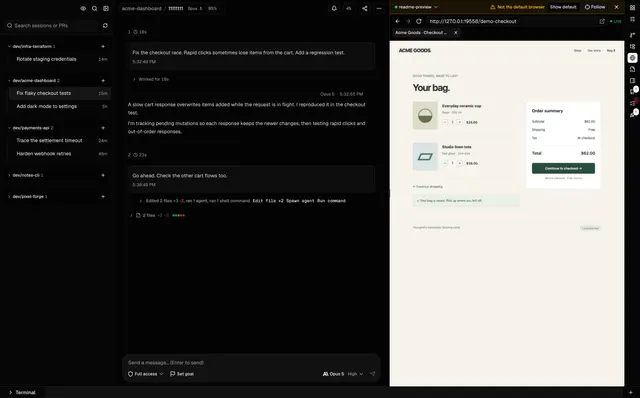
Manage Claude Code, OpenAI Codex and GitHub Copilot CLI sessions in one local desktop or web workspace. It uses those CLIs’ existing logins; the MIT source build omits the separately proprietary Team UI.

The listed option is free to use. Hosting or model usage may still cost money.
The official repository describes Cogpit as free and MIT-licensed, and a source build contains the local desktop/web app. Official binaries may include a separate proprietary Cogpit Team UI that is not covered by the repository license; its current price and terms are not inferred here. Supported CLI subscriptions, model usage and API charges remain separate.
Provider pricing checked 31 Oct 2026.
Documented source-build commands only; AltStack did not execute the repository, launcher or installer. Cogpit is the local workspace; supported agent CLI model access remains subject to the respective providers and account costs.
npx cogpit@latestThe official README documents this local launcher and says it opens the browser interface on an available local port. Keep the terminal open while using it and press Ctrl+C to stop it. This command was not executed by AltStack; it does not install a coding-agent CLI or provide model access.
Documentation checked 2026-10-31; command not executed by AltStack.
Cogpit provider setup documentationRead the repository for the license, installation steps, and operating costs.
Source repositoryView the full software profileRead a practical guide before choosing a plan or setting up a workflow.
How to use an AI coding tool and check its workThis preference stays on your device. It does not change public rankings.
Build apps and fix code with ad-funded coding access; check current model and session limits.
Provider-checked pricing

Repository questions, code edits and shell-driven coding tasks
Provider-checked pricing

Prototype AI workflows visually and connect components into runnable applications.
Provider-checked pricing
Allow Google Analytics to measure page visits and basic device information using cookies? Your searches and form entries are excluded. You can change this choice at any time. Privacy details.