A macOS menu-bar screenshot utility with scrolling capture, an editable annotation window, image styling and pinning. The MIT app is free with no subscription or telemetry according to its README; cloud URL upload requires your own storage configuration.
Free MIT app; bring-your-own storage for sharing
The provider README states no subscription, telemetry or third-party dependencies. Capturing, editing and local history are free. A one-click public URL is optional and requires your own storage account and any storage or bandwidth charges; macOS 14 or newer is documented.
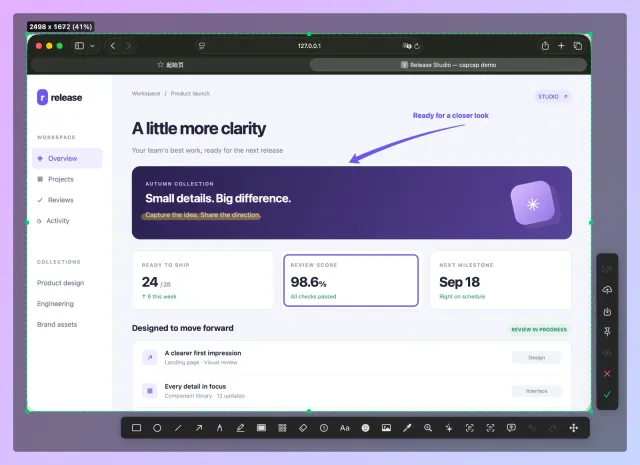
CapCap · Official editor screenshot showing CapCap annotation controls around an upstream sample web page; not an AltStack installation.Product image: realskyrin and repository contributors · MIT License · Original image; layout scaled to fit. Official editor screenshot showing CapCap annotation controls around an upstream sample web page; not an AltStack installation. Full notice.Logo: realskyrin and repository contributors · MIT License · Original image; layout scaled to fit. Official project identity asset used only to identify this independent listing; no sponsorship or endorsement is implied. Full notice.
About CapCap
A macOS menu-bar screenshot utility with scrolling capture, an editable annotation window, image styling and pinning. The MIT app is free with no subscription or telemetry according to its README; cloud URL upload requires your own storage configuration. Visit the project website to check the currently available deployment options.
Release status
Official README and root license were source-checked on 3 November 2026. Local inference, hosting, API, model-weight and storage costs are described separately. AltStack did not execute this repository or its installers.
Follow the publisher’s current installation or quickstart guide for the edition and device you want to use. Tool-specific installation steps have not yet been checked by AltStack.
Open the official website or source repository below.
Check its supported devices and installation requirements, along with the pricing shown on this page.
Follow the provider’s instructions, then try a small non-sensitive sample before using important files.
Self-hosting & quickstart specs
License
MIT
Deployment
Check the provider’s supported deployment method
Free edition / costs
Free MIT app; bring-your-own storage for sharing. The provider README states no subscription, telemetry or third-party dependencies. Capturing, editing and local history are free. A one-click public URL is optional and requires your own storage account and any storage or bandwidth charges; macOS 14 or newer is documented. Pricing evidence.
Devices / hardware
macOS. Check the linked provider instructions for versions and prerequisites.
No one-line command has been verified for CapCap; follow its official installation instructions instead of guessing a Docker image or installer.
Powerful screen capture and file sharing tool for Windows.
The ShareX repository edition is available under GPL with documented installation or build instructions and no required source-license subscription. Build/setup work, your device or compute and storage remain your costs. This check covers that source edition; managed services, premium extensions and commercial relicensing, if offered, are not included or price-verified.
Capture a screen region and add arrows, highlights, text or pixelation before saving locally.
The provider offers free open-source screenshot software. This covers local capture and annotation; your device and storage are separate. Optional uploads and external services have their own terms and costs; no paid recording or cloud allowance is established.
The GPL-3.0 screenshot and annotation source has no required source-license subscription. Your device and storage are separate; optional upload destinations can have their own costs and data handling. This check includes no managed recording or cloud allowance.
Capture and annotate screenshots on desktop with a local editor; the project discloses optional launch-count telemetry and an opt-out.
The GPL application is free to use. Review the project’s telemetry setting; local use has no required subscription, while operating-system and storage costs remain yours.
Record a desktop issue while narrating, annotate it, then give a structured report to a coding agent through its CLI or MCP server. Local Whisper transcription is available; optional OpenAI or DeepL services may use paid APIs.
The desktop app, CLI and MCP server are MIT-licensed and free. Whisper local transcription is available; the model and its own license and local hardware needs are separate. Optional OpenAI or DeepL fallback providers need their own credentials and may charge.
A Windows screenshot and screen-recording tool with a quick editor, local OCR, and no required account.
The project describes the Windows application as free, local, and without telemetry. Video workflows may need FFmpeg. This is a Windows capture tool, not a macOS app or a hosted media service.
Allow Google Analytics to measure page visits and basic device information using cookies? Your searches and form entries are excluded. You can change this choice at any time. Privacy details.